E-Shikshakosh Bihar 2026: Official Portal Login & App 2.0 Download
Navigating the e-Shikshakosh Bihar portal shouldn’t feel like a second job. Whether you are a BPSC recruit marking your first attendance or a Niyojit teacher syncing service records, getting into the eshikshakosh.bihar.gov.in dashboard quickly is your top priority. This independent resource hub provides the latest e-Shikshakosh App 2.0.x download links, real-time server status, and verified fixes for “Out of Range” GPS errors.
The Bihar Education Project Council (BEPC) has digitized everything from UDISE+ student enrollment to leave management, making your 12-digit Teacher ID the most important tool in your professional kit. We strip away the bureaucratic jargon to give you direct e-Shikshakosh login gateways and simplified guides for salary tracking, e-PMS project monitoring, and e-LOTS digital books. Stop struggling with “OTP not received” loops or biometric failures; find the exact technical solution you need to stay compliant and focus on your classroom.
Quick Access: Direct Login Gateway (eshikshakosh.bihar.gov.in)
The e-Shikshakosh official portal serves as the primary dashboard for Bihar’s educational data management. To access your specific services, you must first navigate to the official website and select the correct User Type. Below is the verified, step-by-step gateway to help you log in without errors.
How to Access the Official Portal
- Visit the Site: Open your browser and go to the official URL: eshikshakosh.bihar.gov.in.
- Locate the Login Panel: On the homepage, look for the Login Card on the right side of the screen.
- Identify Your User Type: Before entering credentials, you must click the “Select User Type” dropdown menu. This is the most common step users miss.
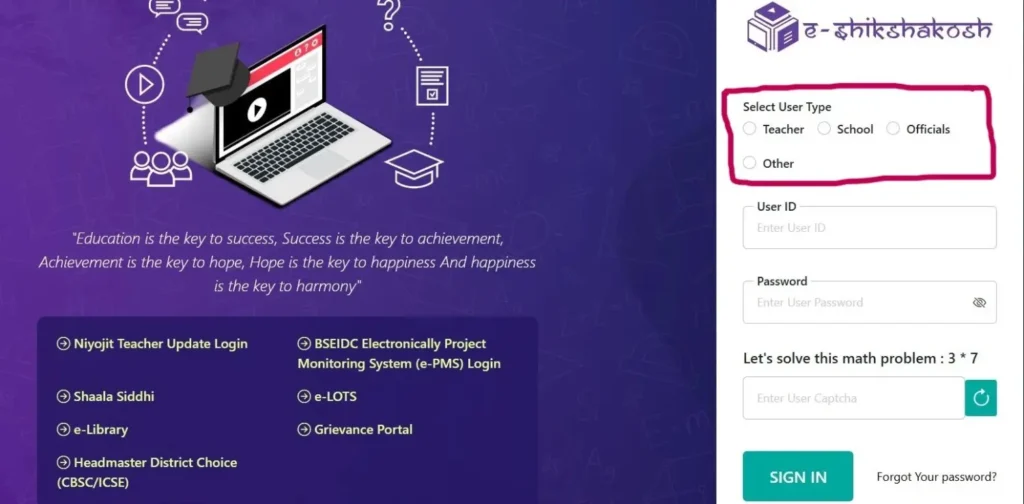
Specific Login Gateways for All Users
| User Category | Required Credential | Login Steps |
| Teacher Login | 12-Digit Teacher ID | Select “Teacher” from the dropdown. Enter your unique ID and password. If you are a new BPSC recruit, use the temporary password provided by your HM. |
| School / HM Login | 11-Digit UDISE Code | Select “School” from the dropdown. Your User ID is your school’s official UDISE+ Code. This grants access to student enrollment and staff monitoring. |
| Niyojit Teacher Hub | Employee ID / District Code | Look for the “Niyojit Teacher Update Login” button (often highlighted in red/yellow). This is separate from the main gateway for contractual data updates. |
| Officer / Admin Login | Departmental ID | Select “Officials” from the dropdown. This portal is for BEO, DEO, and MIS Coordinators to verify data and approve pending requests. |
Important: The Security Math Captcha
After entering your User ID and Password, the official portal requires you to solve a simple Math Captcha (e.g., 7 + 3 = 10 or 5 * 2 = 10).
- Pro Tip: If the image is blurry, click the “Reload” icon next to the captcha box to get a new one.
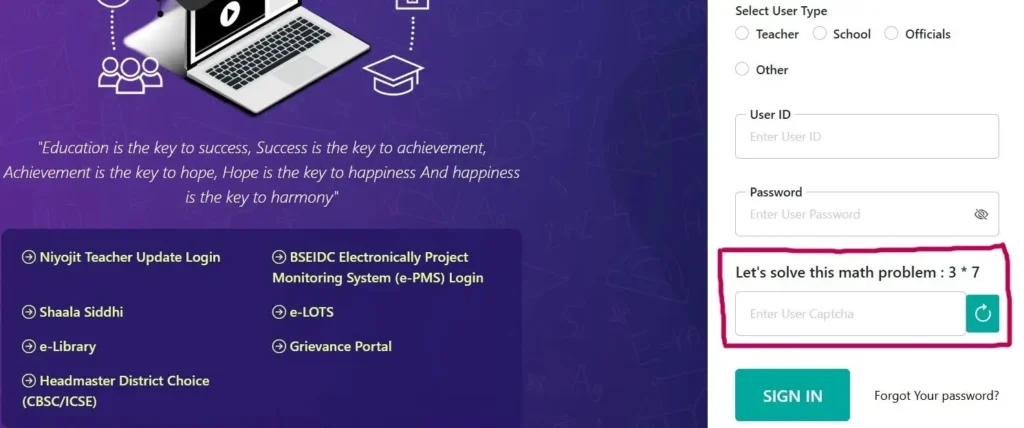
E-Shikshakosh App 2.0.x: Latest APK Download & iOS Update
For teachers in Bihar, the mobile app is no longer optional—it is your daily digital register. However, a simple “Download” isn’t enough; you need the correct version to ensure your Selfie Attendance and GPS Geofencing work without glitches.
How to Download the Official e-Shikshakosh App (Android)
- Search the Store: Open the Google Play Store and search for “e-Shikshakosh.”
- Verify the Developer: Ensure the app is published by the Bihar Education Project Council (BEPC).
- Check the Version: As of 2026, ensure you are on Version 3.5.0 (or higher). This build includes the critical “Fused Location” update which fixes the “Out of Range” error common in older 2.0 versions.
- Grant Permissions: Upon first launch, the app will ask for Camera and Location access. Select “While using the app” to ensure your attendance marks correctly.
The “No Internet” Solution: Marking Attendance Offline
One of the most significant new updates is the Offline Sync capability. If your school is in a low-network area:
- Open the app while at school and click “Mark Attendance.”
- The app will save your timestamped photo and coordinates locally on your phone.
- Crucial Step: Once you reach a stable network (later in the day), you must open the app and click “Upload Saved Data” to push your records to the government server.
E-Shikshakosh for iOS (iPhone Users)
If you are searching for the e-Shikshakosh app for iOS, you likely noticed the App Store version lacks certain administrative features.
- The Fix: Most senior teachers prefer the Safari Workaround. Open eshikshakosh.bihar.gov.in in Safari, tap the ‘Share’ icon, and select “Add to Home Screen.” This creates a high-performance shortcut that functions like a native app but provides the full desktop-grade features of the portal.
Understanding the Digital Ecosystem: What is E-Shikshakosh?
ई-शिक्षाकोष बिहार क्या है? सरल शब्दों में, यह बिहार सरकार के शिक्षा विभाग द्वारा विकसित एक एकीकृत डिजिटल प्लेटफॉर्म है। 2026 में, यह केवल एक पोर्टल नहीं रह गया है, बल्कि बिहार की संपूर्ण शिक्षा प्रणाली की “रीढ़ की हड्डी” (central nervous system) बन चुका है। National e-Governance Plan (NeGP) के तहत विकसित यह प्लेटफॉर्म 75,000 से अधिक स्कूलों, 5.4 लाख शिक्षकों और लगभग 1.77 करोड़ छात्रों के डेटा को एक पारदर्शी सूत्र में पिरोता है।
यह प्लेटफॉर्म भारत के प्रमुख राष्ट्रीय शैक्षिक डेटाबेस के साथ गहराई से जुड़ा हुआ है:
- UDISE+ Integration: स्कूलों का बुनियादी ढांचा (Infrastructure) और छात्र अनुपात सीधे राष्ट्रीय पोर्टल के साथ सिंक होता है।
- Shaala Siddhi: स्कूलों के स्व-मूल्यांकन (Self-assessment) और गुणवत्ता सुधार की ट्रैकिंग इसके माध्यम से की जाती है।
- DIKSHA & e-LOTS: शिक्षकों के प्रशिक्षण मॉड्यूल और छात्रों की डिजिटल लाइब्रेरी (e-Library) का एक ही जगह संगम होता है।
E-Shikshakosh का मुख्य उद्देश्य डेटा के दोहराव (Data Duplication) को खत्म करना और वास्तविक समय में शिक्षकों की उपस्थिति, वेतन वितरण, और छात्र प्रगति की निगरानी करना है।
Obtaining Your 12-Digit Teacher ID & Registration
For newly recruited educators under BPSC TRE 3.0 or 4.0, your 12-digit E-Shikshakosh ID is your digital lifeline. It is the primary key required to mark your daily attendance, link your service book, and ensure your salary processing remains uninterrupted. Understanding the administrative workflow behind this ID is crucial to avoiding long delays.
The “72-Hour Protocol” for ID Generation
Generating a teacher ID is not a self-service task; it follows a strict hierarchical verification path. Once you have officially joined your school, the clock starts on the 72-hour protocol:
- Submission to Headmaster (HM): You must provide your Principal or HM with clear scanned copies of your Appointment Letter, Aadhaar Card, and Bank Passbook.
- HM Portal Entry: The HM logs into the school dashboard and enters your data into the Teacher Registration Module. Accuracy here is vital—a single typo in your Aadhaar name can stall the entire process.
- District Verification: Once the HM submits your profile, it moves to the District Education Office (DEO). The District MIS team verifies your credentials against the state’s recruitment records.
- ID Issuance: Upon DEO approval, the system automatically generates your unique 12-digit ID, which is typically sent to your registered mobile number via SMS within 3 days.
Gap Filler: What if your ID is “Returned with Query”?
Many new teachers find themselves waiting weeks for an ID that never arrives. Often, the application has been “Returned with Query” by the DEO office. This is a common bottleneck that many third-party guides fail to mention.
- How to check: Ask your HM to check the “Application Status” in the school’s login. If the status is not “Pending” but “Returned,” there is a specific error to fix.
- The Solution: Common “Queries” include blurry document uploads or a mismatch between your BPSC certificate name and Aadhaar name. Your HM must rectify the specific error noted by the DEO and re-submit the form. Once re-submitted, the 72-hour cycle begins again.
Ensure your mobile number is correctly linked to your Aadhaar before starting this process, as the Aadhaar-linked OTP is the final gate for profile activation.
Advanced Troubleshooting: Fixing Common App & Portal Errors
Technological hurdles are the leading cause of frustration for educators in Bihar. The e-Shikshakosh App v3.5.0 has introduced several security layers that, while protective, can be difficult to navigate on older devices or in rural areas with spotty connectivity. Below is a Common problems, their technical causes, and solutions are listed below.
Quick Fix Diagnostic Table
| Common Issue | Technical Reason | Fix |
| “Out of Range” Error | Your GPS coordinates don’t match the school’s Geo-fencing data. | Calibrate your GPS: Open Google Maps first and walk 5-10 meters until the “Blue Dot” is precise. Avoid tin roofs or thick concrete walls when marking attendance. |
| OTP Not Received | Bihar Govt SMS Gateway congestion or DND settings. | Airtel/JIO Tip: Ensure your mobile is not in Power Saving Mode. Wait at least 180 seconds before clicking “Resend.” If it fails, try the “Login via Password” method instead. |
| Biometric/Selfie Failure | AI Liveness Detection can’t verify your facial features. | Lighting is Key: Stand in natural light facing the sun/lamp. Do not wear sunglasses or masks. The app requires a clear view of your eyes and mouth to confirm you aren’t a static photo. |
| Master Data Failure | Incomplete sync of school records to your phone. | Go to App Settings > Clear Cache. Log in while on strong Wi-Fi/4G to “Download Master Data” once per day before reaching your school. |
Integrated Modules: e-PMS, e-LOTS & Leave Management 2.0
Topical authority means moving beyond just the login screen. The Bihar Education Project Council (BEPC) has shifted critical administrative workflows into specialized modules.
Leave Management 2.0 (CL, SL, & EL)
Applying for leave is now a 100% digital process. You no longer need to submit a physical application for approval.
- The Process: Open the app, navigate to the Leave Module, select your leave type (Casual Leave, Sick Leave, or Earned Leave), and upload documents (for SL > 2 days).
- The “Approval” Loop: Once you submit, your Headmaster (HM) receives a notification. You are only officially “On Leave” when the status changes from Pending to Approved.
e-PMS: Electronic Project Monitoring System
This is the hub for infrastructure. It is used by BSEIDC engineers and school contractors to track repairs and construction. If your school has a new building project, the updates—including geotagged photos—are uploaded here to release government funds.
e-Library (e-LOTS) & Vidya Bodh
For students and teachers, the Vidya Bodh platform is a treasure trove of STEM resources.
- Access: Look for the e-LOTS icon on your dashboard.
- Value: It provides digitized textbooks for Class 1-12, NEP-aligned simulation labs, and interactive quizzes that teachers can project in the classroom to replace physical materials.
The Demo Portal: How to Practice Without Risk
If you are a new teacher or an HM afraid of making a mistake on official records, the e-Shikshakosh Demo Portal is your training ground. It is a mirrored environment where you can practice every feature.
- Official Demo URL:
https://demoeshikshakosh.bihar.gov.in/(Note: Link status may vary based on BEPC maintenance). - Usage: Use this to practice Student Progression, adding new admissions, or testing the attendance interface.
Critical Safety Warning:
The Demo Portal is a public environment. Never use your real Aadhaar Number, Bank Details, or Private Passwords on the demo site. Use fictional data (e.g., “Student A”, “123456789012”) to test the system. Data entered here is periodically wiped and does not sync with your real service book.
Grievance Redressal: Using the SHAKTI Portal for Salary & Transfers
In an ecosystem as massive as Bihar’s education department, administrative glitches regarding salary delays or transfer mismatches are inevitable. To bypass traditional bureaucratic delays, the SHAKTI (System for Helpdesk and Knowledge-based Tracking of Issues) module has been integrated directly into the portal. This ensures that every complaint is timestamped and assigned to a responsible officer. Similar grievance-redressal and monitoring mechanisms have been adopted by other states as well — Rajasthan’s Shala Darpan portal, for instance, follows a comparable approach by centralizing staff, student, and school-level data to keep accountability transparent across the system.
How to File a Grievance Ticket
- Login to Dashboard: Use your 12-digit Teacher ID to access the main portal.
- Navigate to Grievance: Locate the “Grievance/Service Request” tab on the left sidebar.
- Initiate Request: Click on “Register New Grievance” and select your category—typically Salary and Allowances, Transfer/Posting, or Attendance Correction.
- Upload Evidence: This is the most critical step. Attach a PDF of your relevant document (e.g., Bank Statement for salary issues or the Appointment Letter for transfer disputes).
- Save the Grievance ID: Upon submission, you will receive a unique Grievance ID (e.g., GRV/2026/XXXX). Use this ID in the “Track Grievance” section to see real-time status updates.
Knowing Who to Contact (MIS Coordinator Levels)
If your ticket isn’t resolved within 7 days, you should reach out to the specific MIS (Management Information System) Coordinator responsible for your area:
- Block Level (BEO Office): For individual registration errors, mobile number updates, and local app glitches.
- District Level (DEO Office): For salary holdups, UDISE+ data mismatches, and complex ID generation issues.
Frequently Asked Questions
How do I update my mobile number on E-Shikshakosh?
To update your mobile number, log in to the portal and go to Teacher Module > Teacher Registration. Click “Edit,” enter the new 10-digit number, and verify it via the Aadhaar-linked OTP. Note that the change typically takes 24 hours to reflect across the attendance and payroll systems.
Is the 2.0 app version mandatory for attendance?
No, you should upgrade to Version 3.5.0 (2026 Build). While the 2.0 version introduced digital attendance, the new update is mandatory for the new “Fused Location” technology, which prevents the “Out of Range” errors common in the older 2.0 version.
Can private schools use the eshikshakosh.bihar.gov.in portal?
Yes. Registration is mandatory for all private schools in Bihar to ensure Student Data Mapping. Private schools must use their official 11-digit UDISE+ Code as their User ID to track student enrollment and transfers to government institutions.
What is the official helpline for Bihar Education Department?
The official technical helpdesk can be reached at 0612-2215181 or via email at [email protected]. For administrative queries, it is recommended to contact your respective Block Education Officer (BEO) first.